AI Tools for Teachers vs AI Tools for Students
Teacher AI saves time; student AI builds understanding.
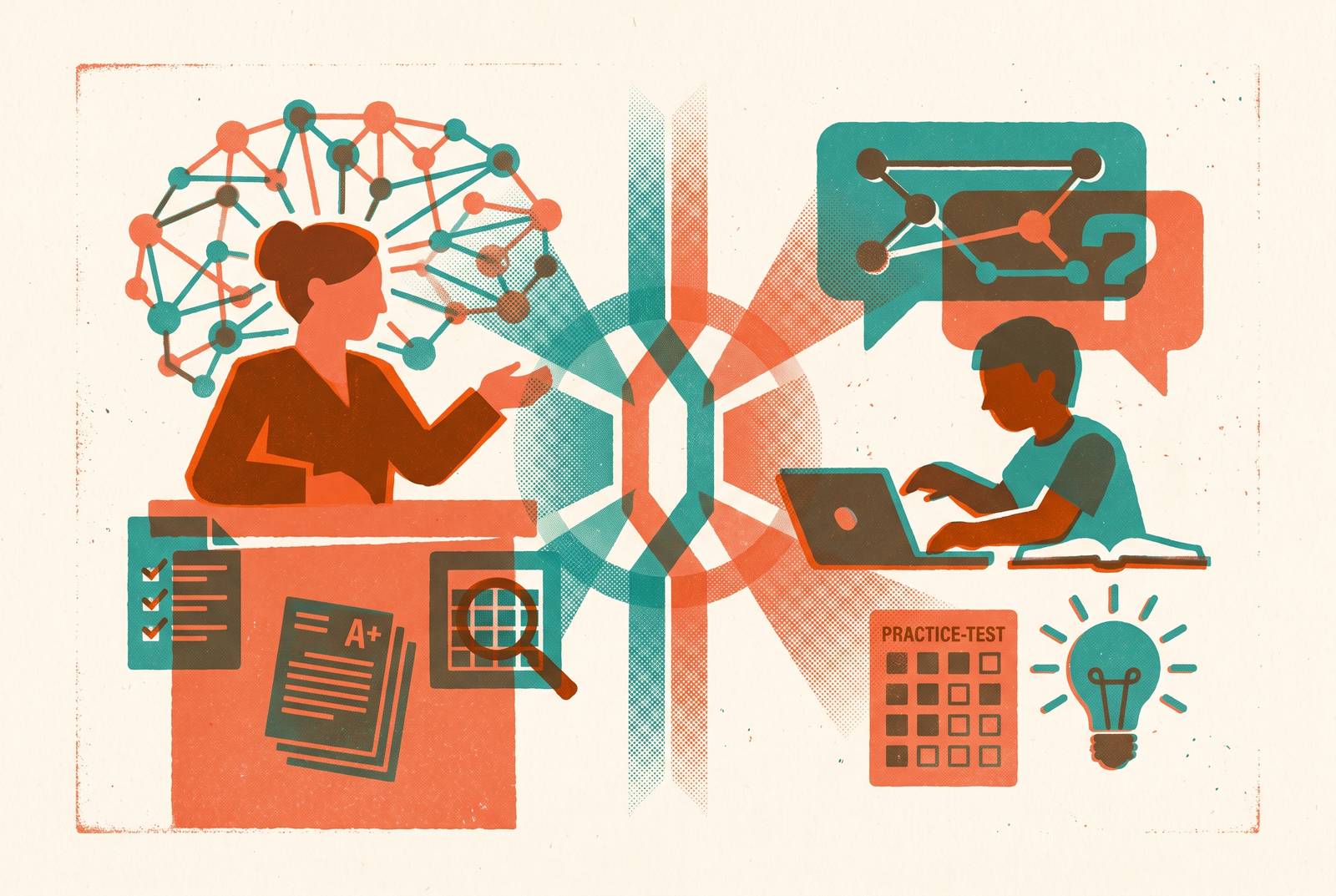
"AI for education" sounds like one thing. It isn't. The market has split into two separate categories that barely overlap: tools built around what teachers do all day, and tools built around what students need to actually learn. A lesson planner and a tutoring app might both say "AI" on the label, but they're solving completely different problems for completely different people.
The split appears in what each group actually wants. Teachers want efficiency from AI above all: getting hours back. Students want something closer to understanding: finding the right information, grasping a concept that didn't click the first time. Those are not the same job, and no single tool does both well.
A tool that saves a teacher three hours on lesson planning doesn't teach a single student anything new, which creates a problem. A tool that adjusts in real time to a student's weak spots doesn't grade one essay in that teacher's large stack of tests. Schools that hand students a teacher-facing tool, or assume that because teachers are saving time, students must be learning more, are solving for the wrong outcome. Knowing which tool does which job is what separates AI that actually improves learning from AI that just makes the paperwork lighter.
What teacher-side AI is designed to do
Teacher-facing AI lives in the planning and grading layer of the job, not the learning layer, and that's exactly where its value sits. These tools don't try to teach a student anything directly. They clear the runway so a teacher can.
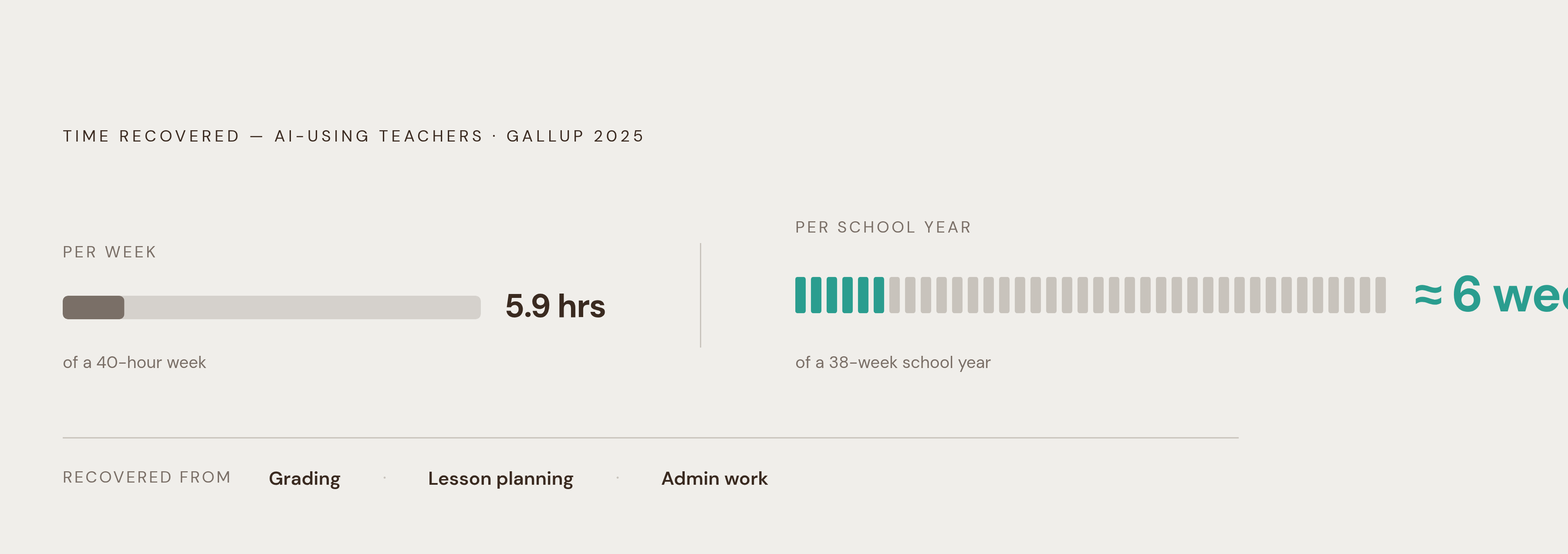
The actual list of jobs is long: writing lesson plans, building rubrics, rewriting a passage at four different reading levels for four different groups of students, drafting IEP accommodation language, writing parent emails, and helping grade a stack of assignments. These are the tasks that eat up a teacher's day outside of actual teaching, and they are what this category targets. Gallup's 2025 survey found that teachers who use AI weekly get back roughly 5.9 hours a week, close to six full weeks over a school year, mostly from grading, planning, and admin work.
What makes a purpose-built teacher tool different from just opening a general chatbot is context. A tool built for classrooms already knows the state standard codes, the grade-level expectations, the pacing guide, and the specific language an IEP requires. A generic assistant has to be told all of that every time.
Diffit shows this well: it rewrites a single text across more than 70 languages and adjusts it to whatever reading level a teacher needs, with a free tier that includes a 60-day premium trial before a paid monthly plan kicks in. Gradescope takes a different piece of the job, clustering similar student answers together so a teacher grading a large stack of tests isn't reading the same mistake dozens of separate times. It works especially well for STEM subjects and anything with handwritten, coded, or formatted answers, though teachers use it across subjects. Curipod turns an existing slide deck or a topic prompt into something interactive, with polls, word clouds, drawing activities, and live AI feedback on open-ended student answers, free for teachers with weekly session caps. SchoolAI sits a bit differently: it lets a teacher build a personalized AI tutor for students, but the teacher watches the conversation happen in real time, with the free trial capped at five Space sessions a year. That design, a student talking to AI while the teacher keeps the controls, is a bridge between the two categories, but it's still built around teacher oversight, not student-driven adaptation.
What ties all of these together is the layer they operate on. None of them are trying to figure out what a specific student does or doesn't understand. They're built to make the teacher's workload lighter, and on that job, they genuinely deliver.
Where teacher AI stops and student learning begins
A teacher who spends less time planning is not the same thing as a student who understands more. That gap doesn't close on its own, and teacher-side AI was never built to close it.
Research published in CITE Journal, and covered by Education Week, found that AI-generated lessons often left out multicultural or diverse content and mostly activated lower-order thinking skills like memorization rather than deeper reasoning. An efficiently generated lesson plan isn't automatically a better one for the students sitting in front of it. Research also shows that teachers evaluate AI tools differently depending on what they're measuring: judged against their own workflow, these tools look great; judged against student learning outcomes, the picture gets a lot murkier.
Trust is part of this too. Most teachers don't trust AI to complete tasks without errors, and a large share name plagiarism as a real concern when it comes to how students use these same tools. Teachers adopting AI for their own workflow doesn't resolve a single question about whether students are using AI with integrity on their end.
SchoolAI's monitored-chat setup is a good illustration of where the ceiling sits. The teacher can watch the conversation and set the guardrails, but the system itself isn't adjusting to what one particular student actually understands or doesn't. Once a lesson is delivered, whether each student grasped it, and where exactly their understanding broke down, stays an open question that teacher-side tools were never built to answer, which is the opening student-side AI exists to fill.
What student-side AI is built to do differently
Student-facing AI runs on a different loop. It's built to notice where a student's understanding breaks down, and adjust the next question based on that, in real time.
Where teacher tools operate at the planning-and-assessment layer, student tools live in practice and retention. The best ones use adaptive algorithms that respond to how one individual student answered the last question, not how a class performed on average last week.
The feature that actually separates a real student-learning tool from a souped-up search engine is knowledge gap detection. By analyzing a student's responses against a knowledge graph in real time, a well-built tool can identify a specific weak spot and send targeted practice at it, instead of just handing over another round of generic problems. Platforms built this way generate individual recommendations and adjust question difficulty on the fly, which moves both the quality of teaching content and the actual learning outcomes in ways a static worksheet or PDF never could.
There's a real cognitive science basis for this, not just convenience. Practice that mirrors a test's structure, adjusts difficulty as a student answers, and concentrates repetition on exact weak points lines up with what research on retention and score improvement supports. Drilling blindly through hundreds of problems isn't the same as drilling the right 20.
That's why the most active corner of the student AI market right now is SAT and AP test prep. The SAT's move to a fully digital, adaptive format made static PDFs and paper practice books structurally behind the times, and that shift created real demand for tools that can adapt the way the test itself now does.
Student AI tools for SAT and AP prep: what the field looks like
Most student AI tools built for SAT and AP prep share a similar skeleton: adaptive practice, AI grading, and some form of gap detection. What separates them is how far each one actually goes in chasing real understanding versus just optimizing for a higher score.
Passionfruit is built specifically around AP subjects and the SAT, and it goes a step past simply tracking what a student got wrong. It tracks what a student actually understands, where their reasoning breaks down, and what specific gaps sit between where they are and where mastery would be, then builds a plan aimed at closing those gaps. It offers unlimited practice problems with AI-powered grading built in, and the difficulty adjusts to each student's actual knowledge state rather than sorting students into broad "easy, medium, hard" buckets. It's built for individual students studying on their own, and also for teachers or schools trying to close knowledge gaps across a whole classroom. The idea behind it, that just doing more problems isn't enough if nobody's tracking where understanding actually breaks down, maps directly onto what the research on adaptive learning supports.
Whiz Pro is a lower, more accessible monthly price point under its 2026 pricing, and unlocks an AI tutor, step-by-step walkthroughs, a "Road to 1600" SAT course built around personalized pacing, and AP exam support with AI grading built in.
Crimsora takes a voice-first approach. A live session involves a synthetic tutor talking a student through a concept out loud, with a shared whiteboard both can see and mark up. It covers a wide range of courses, including the SAT, ACT, and AP subjects, though its "unlimited" tutoring claim comes with a published fair-use cap on live voice hours each month.
Google's student-facing Gemini hub takes yet another approach, built around "study notebooks" that run diagnostic quizzes to flag a student's strengths and gaps, then build a short, specific study plan around the results. It also lets students upload their own course materials and generate practice quizzes from that content, as part of its Back to School 2026 feature set. Generating interactive visuals and taking practice quizzes on any subject, including standardized tests like the SAT, is a Google Search feature, separate from the Gemini student hub itself.
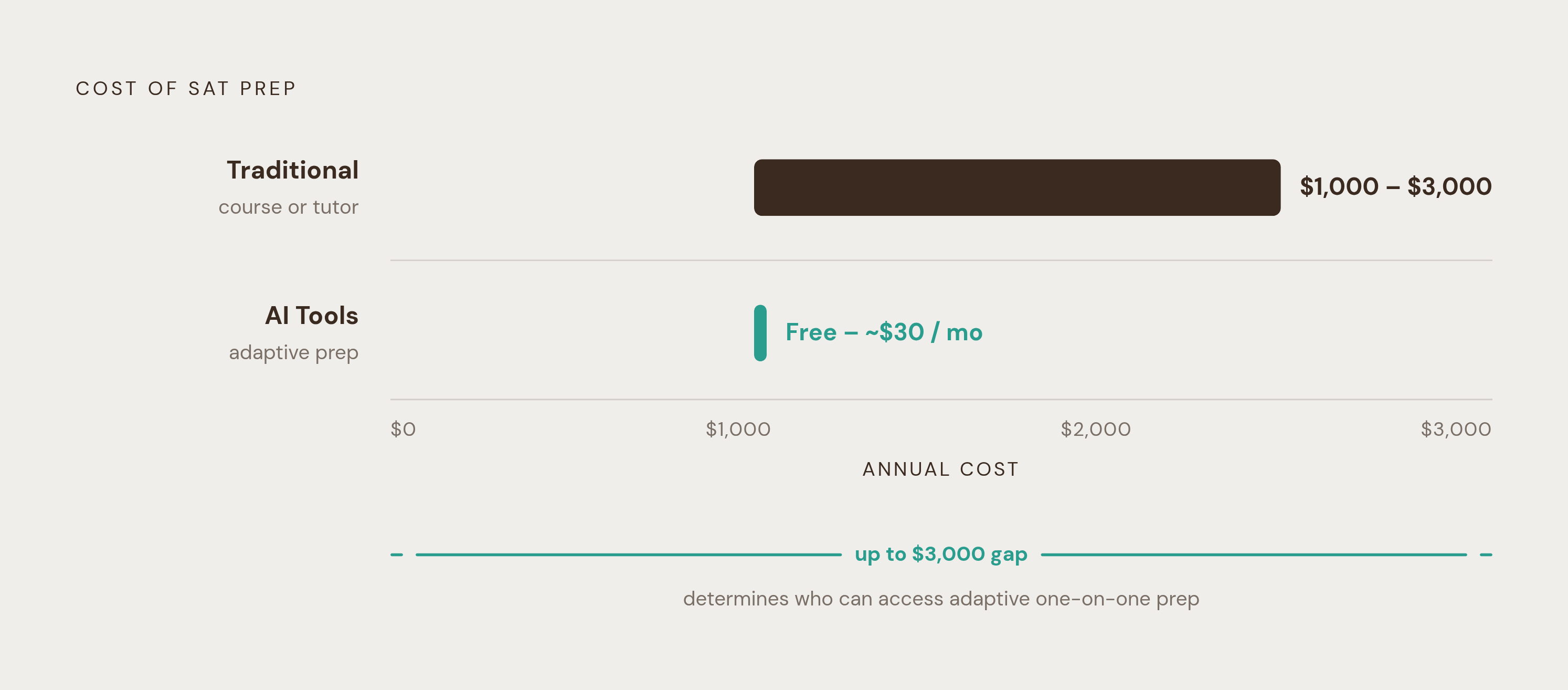
Cost determines who gets access to good prep. A traditional SAT prep course runs somewhere between $1,000 and $3,000. The AI tools covered here range from free to a modest monthly fee, a gap large enough to change which students can actually get adaptive, one-on-one-style prep instead of a secondhand workbook.
AI grading as the hinge between teacher efficiency and student understanding
AI grading looks like a teacher convenience on the surface, and it is one. But done well, it's also the mechanism that turns a pile of student answers into the diagnostic data that makes personalized learning possible.
On the teacher side, CoGrader claims it cuts essay grading time by up to 80% for ELA teachers, freeing up hours that would otherwise go to marking up the same five recurring errors across a substantial stack of papers.
On the student side, the value of AI grading depends entirely on what comes back with the score. A number alone teaches nothing. A student who sees an explanation for why an answer was wrong learns something that a red checkmark never could. Passionfruit's AI-powered grading is built around that same dual function: it takes the grading burden off a teacher's plate while generating the exact diagnostic signal that drives its own gap-detection and personalization engine. The grading itself is the input the rest of the system runs on, not the finish line.
None of this is free of real tension. Researchers point to legitimate concerns around data privacy, potential bias baked into automated grading systems, and a lack of transparency in how these algorithms actually score a response. The general position in the research is that AI-assisted essay scoring should complement human grading rather than replace it, and that improving the accuracy and reliability of these systems remains an open priority.
A 2026 systematic review found that, layered on top of this, AI is increasingly used to support academic integrity monitoring at the same time it's used for automated grading. That means the same AI ecosystem that's helping a student produce an essay is often the same ecosystem an institution leans on to check whether the student actually wrote it. Any school running both categories of tool at once has to sit with that tension rather than pretend it isn't there.
Student AI Tools: The Equity and Metacognition Problem
Student-side AI doesn't close learning gaps automatically. Under the wrong conditions, it can widen them, either because a student doesn't have the self-management skills to use the tool well, or because access to the tool itself isn't equal to begin with.
Classroom research shows a split: high-achieving students tend to use AI tools actively, treating them as an extension of their own curiosity, asking follow-up questions, pushing back on answers. Struggling students more often fall into one of two patterns: avoiding the tool out of fear of getting it wrong, or leaning on it uncritically and walking away with a correct answer but none of the reasoning behind it.
Educators describe this as a self-regulation problem as much as a tool problem. Students who already know how to monitor their own understanding tend to get real value out of adaptive AI. Students who don't have that skill yet can finish an AI-assisted assignment with a completed worksheet and nothing durable in their heads. The real risk sits in that space between a finished output and actual understanding, and no tool closes that gap by itself.
There's a bias risk layered on top of this. If the systems behind these tools are trained mostly on data from students in well-resourced schools, they may end up systematically underestimating the abilities of students from different linguistic or cultural backgrounds. It is the kind of bias an adaptive algorithm can make worse instead of better, since the whole point of adaptive difficulty is to respond to patterns in the data it was trained on. Tools built specifically for student learning, Passionfruit among them, are trying to operate on a different cognitive layer than teacher-side efficiency tools, analyzing not just what a student got wrong but where the reasoning actually broke down. Passionfruit Learning, an AI-powered AP and SAT prep platform, anchors that approach in performance analytics tied to each student's specific gaps. That design goal depends on the conditions it's deployed under: the student's own habits, and the fairness of the data the system learned from.
Sources
- I Tested 14 AI Tools as a Teacher — Only 7 Work
- The 6 Best AI Tools for Teachers in 2026 (And When to Use Each One)
- ALIGNAgent: Adaptive Learner Intelligence for Gap Identification and Next-step guidance
- Human-Centered Design for AI-based Automatically Generated Assessment Reports: A Systematic Review
- Practitioner Voices Summit: How Teachers Evaluate AI Tools through Deliberative Sensemaking
- Whiz