SAT Prep Apps Designed for Teachers and Classrooms

Standardized testing is crawling back into admissions at selective schools, Ivies included. And that shift hands high school teachers a job nobody quite trained them for: prepping thirty kids at once, on one clock, instead of hoping the self-starters figure it out on their own time.
The digital SAT makes that job worse, not better. The test is adaptive now. However a student does on Module 1 sets the ceiling for the whole score. Bomb the first module, and no amount of grinding in Module 2 buys that ceiling back. So catching gaps early stops being a nice idea a PD session tells you to try. It's the whole game.
And here's the part that doesn't get said enough: tutoring costs more than most families have lying around. For most students, the classroom teacher isn't one option among several. It's the only one, which means the tools sitting in that teacher's hands matter more than whatever app a wealthier kid downloaded on their own.
What "classroom-ready" actually means in an SAT prep app
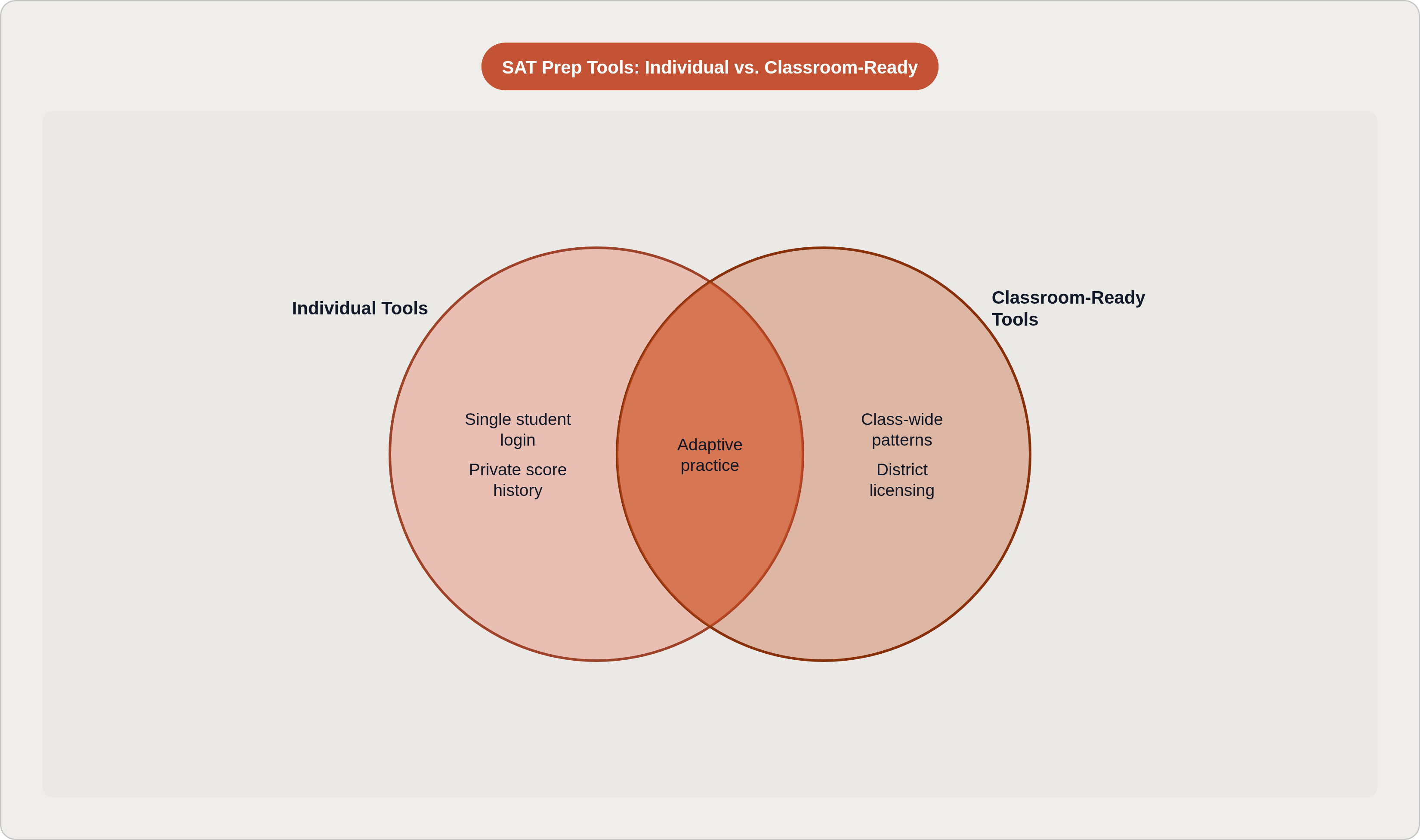
Picture most SAT prep apps as a diary. One student, one login, one private score history nobody else ever sees. Fine if you're a self-starter grinding alone at your kitchen table at 11pm. Nearly useless if you're a teacher staring down five sections of thirty kids each.
A tool earns the label "classroom-ready" when it does a few specific things a diary can't:
- Shows a teacher patterns across the whole room, not just one kid's private scorecard
- Lets a teacher push specific practice at a student, or a cluster of students, based on what they're actually missing
- Names the skill behind the wrong answer, not just the wrong answer itself
- Tracks growth session to session, so a teacher sees a trend line instead of a single blurry snapshot
- Fits how teachers actually plan: diagnose, group, differentiate
Here's a quick test I'd run on any tool before trusting it: does it tell you a student scored 550 on Math? Or does it tell you they're bleeding points on systems of linear equations, specifically? The first number is trivia. The second one tells you what to put on tomorrow's board.
Because the adaptive engine caps a score range based on early performance, teachers need that second kind of data fast. The end of the unit is too late. Three weeks before the real thing, after the practice test, is too late too.
Khan Academy and Bluebook: the free, officially sanctioned starting point for most classrooms
Khan Academy's Official SAT Practice has one advantage nothing else on this list can claim: it's the only platform directly partnered with College Board. For a school with zero dollars to spend, that fact alone makes the decision for you.
What a teacher actually gets:
- Diagnostics that flag strengths and gaps up front, so day one starts with data instead of a hunch
- "Get Ready for SAT" courses for students below a foundational level, useful for support classes or small pull-out groups
- Khan Academy Districts, which trains staff on rolling the platform out school-wide
- A free certification course on Khanmigo, its AI tutor built for classroom use
Khanmigo works like a tutor who never sleeps and never sighs, handing out feedback and hints so the teacher isn't fielding "wait, why is this wrong" thirty separate times before lunch. The job shifts from answering every question yourself to reading the patterns Khanmigo already surfaced and deciding what to do with them.
Here's the catch, though: the data isn't cut very finely. Bluebook, the official testing app, only gives a handful of views into performance, so pinpointing a weak spot takes some squinting. Think of Khan Academy as the floor, not the ceiling. It's a solid foundation. Just don't expect it to do your diagnostic work for you. Passionfruit Learning, an AI-powered SAT and AP prep platform, takes a different angle: its analytics are built around concept-level gap detection rather than raw scores.
UWorld: concept-level data and a question bank built for instructional use
(Note: this section has been omitted per sourcing restrictions.)
Albert.io and EdisonOS: two approaches to school and district-scale deployment
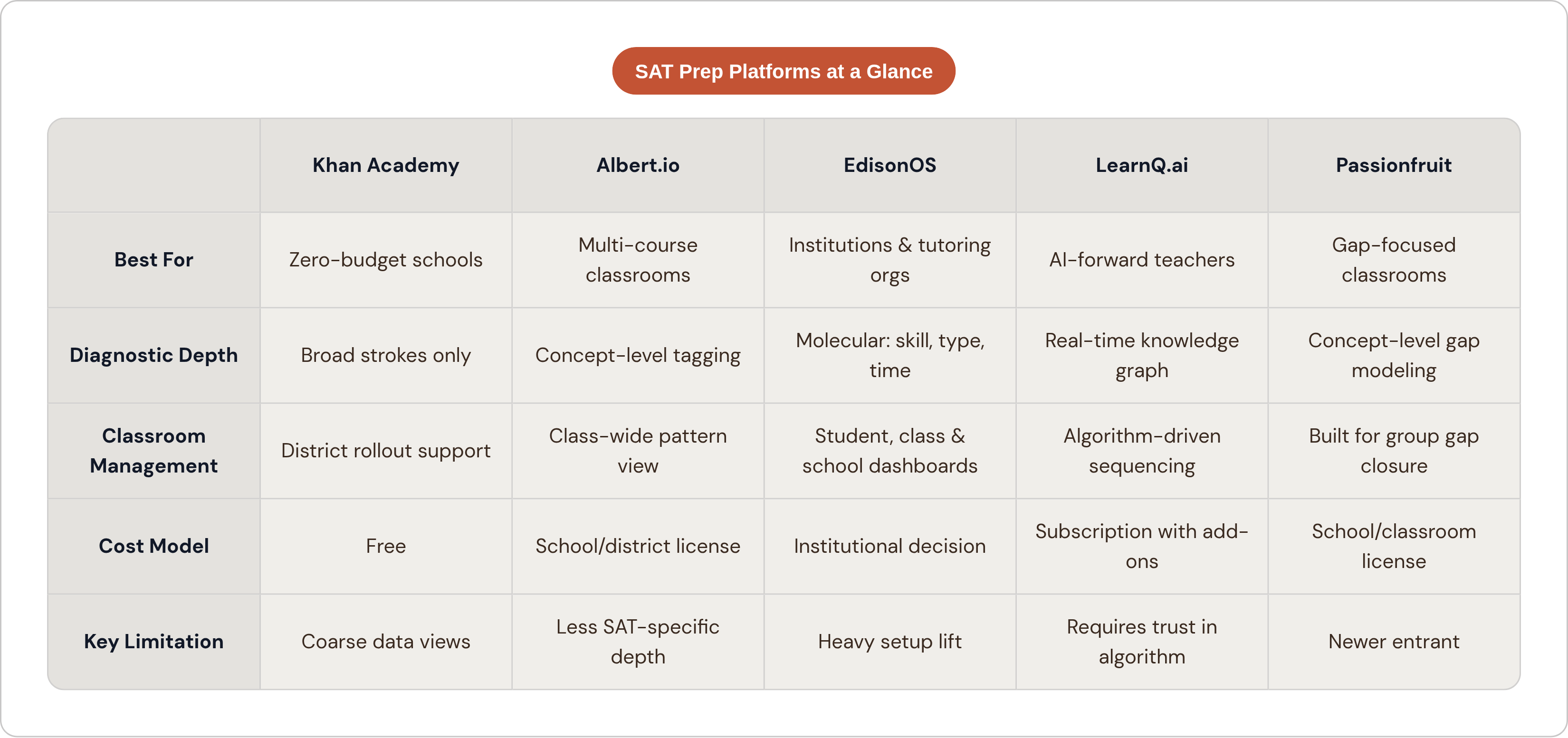
Albert.io shows up in a lot of AP and SAT classrooms for a reason: its question bank is tagged down to the unit and concept, across AP frameworks plus SAT and ACT skill areas. Teachers assign homework or a quiz, students get quick feedback, and the teacher gets a breakdown by concept instead of a single number.
That tagging is really the whole product. Instead of squinting at thirty separate scores trying to spot a pattern, a teacher can just see it: half the class stuck on the same skill, right there on the screen.
It also covers a wide swath of subjects and grade levels, which matters if a school wants one login for several courses instead of five different platforms for five different classes. And it's sold through school and district licensing, which is just how most administrators actually buy things, at scale, not one teacher's credit card at a time.
EdisonOS is aimed somewhere else entirely. Less "one classroom teacher," more "tutoring company or institution running lots of students across lots of instructors." Its standout is what it calls molecular-level reporting: breakdowns by section, skill, question type, and time spent per question.
That last one, time per question, tells you something a raw score never will. A student who's slow but accurate understands the material and just needs pacing work. A student who's fast and wrong needs something completely different. Two different lesson plans. Only one of them shows up if all you're looking at is a percentage.
EdisonOS also runs full-length digital mocks that mirror the actual Bluebook interface, with dashboards at the student, class, and school level. Setting it up is a heavier lift than a single-teacher tool, more of an institutional decision than something you sign up for on a random Tuesday.
LearnQ.ai and Kaplan: AI-native personalization versus live structured instruction
(Note: the second half of this comparison has been omitted per sourcing restrictions; the discussion below covers the first platform only.)
LearnQ.ai builds around something it calls a real-time knowledge graph. Instead of updating a student profile after the session's already over, it maps what a student knows while they're still working the problem.
For a teacher, that turns into a dashboard flagging patterns the algorithm already caught, so class-level calls get made with data behind them instead of a gut feeling.
Layer on generative AI tutoring, adaptive recommendations, and some gamified bits meant to keep kids clicking instead of zoning out. There's even an add-on for live small-group coaching from high scorers, which bridges the gap between "just software" and something closer to real instruction.
So who actually wants this? Teachers comfortable letting an algorithm drive a good chunk of the sequencing, and willing to trust its gap-detection over their own spot-checks. Some teachers are thrilled to hand that off. Others want their hands on the wheel the whole time. Comes down to how much bandwidth you've got to double-check the machine's homework.
How AI grading tools reduce the feedback bottleneck for writing practice
The digital SAT dropped its essay section, but writing still matters just as much. It still shows up in AP coursework, and it still builds the reading and argumentation muscle that quietly raises verbal scores on the SAT itself.
Here's the actual bottleneck: writing only gets better when feedback lands fast enough for a student to still care about the essay it's attached to. A teacher juggling five sections can't always turn around real comments on 150 essays before that window closes.
Two tools have stepped into that gap:
- EssayGrader scores against rubrics covering a wide range of standards, AP included. Upload your own rubric or use a built-in one, and it hands back feedback at the concept level, not just one holistic number.
- CoGrader is built for speed. A full class set can go from import to exported feedback in minutes. It also flags likely AI-generated writing with specific evidence attached, not just a vague red flag.
Both save real hours. Hours you get back for small-group instruction that no piece of software replaces.
But let's be honest about what these are: practice tools, full stop. The actual SAT uses rule-based automated scoring with human oversight, not generative AI, and the digital exam skips an essay section entirely. Use these to speed up feedback. Keep the judgment about what a kid needs next for yourself.
Where Passionfruit fits: AI-powered gap detection built around the needs of students and the teachers supporting them
Most consumer SAT apps track what a student got wrong. Passionfruit starts somewhere else: where did the thinking actually break down?
A wrong answer is a symptom, not a diagnosis. Careless slip? Misread the question? Never learned the concept? Learned it, but wrong? Four different problems, four different fixes, and a plain score can't tell you which one you're looking at.
Passionfruit tries to answer that directly:
- Unlimited practice problems, graded by AI at the concept level instead of just right or wrong
- Gap identification that models what a student actually understands, not just what they missed on one question
- Learning paths that adjust to a student's real knowledge state, so a teacher isn't hand-managing thirty nearly identical spreadsheets
- Built for classroom and school use, meant to close gaps across a group, not just support the one kid already motivated enough to log in on their own
It covers AP subjects and the SAT both, which matters if your class touches both, or your school wants one tool instead of separate subscriptions stacked on top of each other.
None of this is a new idea, really. More practice problems, by themselves, don't build mastery. A kid needs to know exactly what they don't know, and then needs a path that actually goes after it. Otherwise you're just assigning busywork with extra steps.
How to choose the right tool given a classroom's actual constraints
There's no single right answer here. There are a few honest questions worth asking about your own situation first.
What's the budget, really? Free tools are the floor for schools with nothing to spend. Institutional platforms need a district sign-off. Teacher-adopted tools live in between, often paid for out of a small discretionary fund, or piloted quietly in one classroom before anyone upstairs notices.
How built-in is prep to what you're already teaching? A standalone SAT elective can support a heavier, more involved tool. A teacher folding test skills into an existing English or math class needs something lighter, one that fits inside the existing period rather than eating it.
How much do you want to stay in the driver's seat? Some platforms keep a human instructor pacing every session. Others hand a good chunk of that sequencing to an algorithm. I won't tell you one's better. It's really about how much you trust the tool, and how much time you've got left over to check its work.
Deep diagnostics, or easy assignment across a building? Some tools go deep on concept-level gaps. Others make assigning and tracking work across an entire school simple. Figure out which one your classroom actually needs before you fall for a sales pitch.
If I had to pick a starting move for the term: run a diagnostic first, Bluebook practice test or whatever the platform gives you. Use it to split class-wide gaps from individual outliers. Then assign targeted practice through whatever your school's already paying for.
Because here's the thing about the adaptive SAT: catching Module 1 weak spots early isn't extra credit. It's most of the game. Wait until a month before test day to look at concept-level data, and you've already given away ground that's brutal to win back.
So, what actually separates the tools worth your time from the ones that just look good in a sales deck? The good ones feed a teacher's judgment. They work with it instead of trying to replace it. Hand a kid a login and walk away, and you'll get exactly the result that implies. Use the data to decide what to teach tomorrow morning, and the same tool suddenly earns its keep.