Best AP Physics Practice Apps for Conceptual and Calculation Questions
Three apps help students master AP Physics 1's toughest conceptual and calculation skills.
AP Physics 1 has one of the toughest score distributions of any AP exam. Only a small share of students who sit for it walk away with a 5, and the reason isn't that the material is unusually obscure. The exam is built in a way that punishes a narrow kind of studying.
Start with the format itself. As of the 2026 administration, AP Physics 1 runs as a hybrid digital exam inside the Bluebook app: multiple-choice questions appear on screen, but the free-response section has to be handwritten in a paper booklet. That split means a prep app has to train a student in two completely different modes at once, reading and selecting on a screen, then writing out full physical reasoning by hand. Most apps are built for one or the other. Very few handle both well.
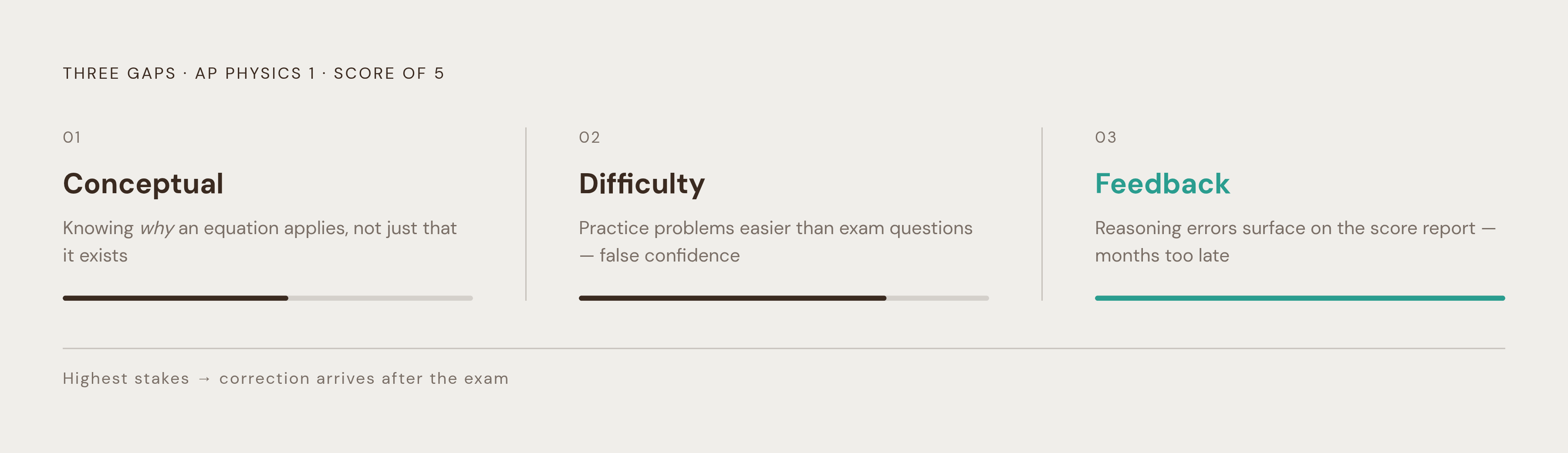
Three gaps sit beneath that format and tend to decide whether a student lands a 4 or breaks through to a 5. The first is the conceptual gap: knowing why an equation applies to a situation, beyond knowing that the equation exists and the numbers plug in cleanly. The second is the difficulty gap: homework problems that feel more manageable than what appears on exam day, so students walk in with false confidence. The third is the feedback gap: not finding out what went wrong in your reasoning until it's too late to fix it, often not until the score report arrives months later.
You can grind through more problem sets, but that won't close any of those three gaps. A student can answer a large share of questions correctly and still lose the FRQ points, because that part of the test checks whether the student can explain, in writing, why a physical law held in that specific scenario. That's a different skill, and it needs a different kind of tool to train it.
Conceptual and calculation demands
The prep app market for AP Physics has split into two jobs. One is building conceptual intuition. The other is drilling calculation. These are genuinely different skills, trained in different ways, and no single app currently handles both equally well.
Conceptual work asks a student to produce a verbal justification: to state, in a full sentence, which physical condition makes an equation legal in this case and not in another. You also need to read experimental setups and explain why a design choice, like holding a control variable fixed, was made. None of that is the same muscle as solving for a variable.
Calculation work asks for procedural discipline. You need to set up a free-body diagram before you write the force equation, check whether a conservation law applies before you jump into algebra, and catch a dimensional error before it wrecks three more steps of work. That's a workflow, not a formula lookup, and it has to be practiced as a sequence.
Some apps claim to cover both with adaptive, all-in-one dashboards. Those dashboards can track which topics a student got wrong, but that isn't the same as diagnosing them. A performance chart can tell you a student is weak on rotational motion without ever telling you the student thinks torque only matters when something is actually spinning. That's a meaningful difference: passive analytics record outcomes, while active diagnosis explains the thinking behind them.
On test day, a student who can push numbers through an equation but can't state the condition that made that equation legal in the first place will lose FRQ points no matter how many multiple-choice questions an app has served them in the weeks before. Volume doesn't substitute for reasoning.
The practical answer, backed by commentary from people who build these tools, is to combine apps chosen deliberately for specific jobs rather than relying on one platform to do everything. No single tool today covers visualization, one-on-one tutoring, calculation drilling, and FRQ coaching equally well. The sections that follow map out which apps do which job best, so a student can build a toolkit instead of hoping one app happens to cover everything.
Apps built for conceptual understanding and verbal justification
Conceptual fluency means being able to justify an answer in a complete sentence. Training that skill requires a tool that actually asks for reasoning out loud, and then remembers where that reasoning falls apart so it can come back to it later.
Passionfruit Learning is built around that exact problem. Its AI-powered practice looks for where a student's knowledge actually breaks down, so it does more than log which questions they got wrong. It generates practice problems and grades them with AI that evaluates the reasoning behind an answer, not just whether the final number matches, which goes straight at the feedback gap that most apps leave wide open. Instead of producing a list of missed questions, it builds a running picture of what a student understands and what they don't, and uses that picture to put together a plan for closing the specific gaps that remain. That's the kind of active diagnosis a static dashboard can't offer, because a dashboard only tells you what happened, not why. It tends to suit students who want an ongoing, personal record of their conceptual weak spots rather than a one-time list of wrong answers, and it gives teachers a window into where an entire class's reasoning is breaking down, not just which boxes got checked wrong.
Brilliant.org, available on web and app for $12.50 to $25 a month, takes a different approach aimed at the same underlying skill. Its physics courses, covering Classical Mechanics, Electricity and Magnetism, and Quantum Mechanics, are built around visual, interactive problem-solving rather than test-format drilling. That visual approach fits physics especially well, because you need spatial intuition as much as you need the math. Students work through short lessons one problem at a time, and the platform brings back review problems at spaced intervals to keep ideas from fading. Brilliant's content builds conceptual intuition, but it isn't aligned to the AP exam's format. A student using it as a standalone prep plan is missing the test-specific practice needed to turn that intuition into exam points. It works best paired with something built for the exam itself, not used on its own when the goal is a specific AP score.
Apps built for calculation fluency and structured problem-solving
Calculation questions on AP Physics ask for more than checking a final answer against a key. A student needs to know which physical conditions authorize a given equation in the first place, then set up the problem in the right order (free-body diagram before the force equation, a check on whether a conservation law applies before touching the algebra), and catch small errors before they snowball through several more steps. That's a structured process, and it needs repetition to become automatic.
VirtuePrep AP Physics Practice Test, available on both iOS and Android, is built for exactly that kind of repetition. It offers more than 700 AP-style questions spanning mechanics, motion, forces, energy, momentum, electricity, circuits, optics, thermodynamics, waves, and fluid mechanics, each with step-by-step explanations, plus full-length mock tests for both AP Physics 1 and 2. Its Smart Performance Dashboard uses cloud analytics to track accuracy by topic, study trends, and weak areas, and its Personalized Study Planner lets you set goals and zero in on specific units. The app stays in the MCQ and calculation lane. It doesn't offer AI-generated FRQ coaching or prompts that push a student toward verbal justification, and that's not a flaw so much as an honest boundary. If you want calculation reps, you know what you're getting, and if you need FRQ practice, you know to look elsewhere for that.
Jenova Physics Tutor offers paid plans and sits in a similar space, but it leans into level-adaptive coaching that bridges toward conceptual work as well. It still leans on structured problem-solving as its primary strength, walking a student through the discipline of setting up and executing multi-step physics problems, so it belongs in this lane even though its coaching touches reasoning too.
Physics Lab, found at physicslab.app and aligned to the AP Physics 1 curriculum for 2026 to 2027, takes a slightly different shape. It provides four full multiple-choice practice tests, each with solutions, along with more than 900 practice problems organized by topic, lab activities, and slide decks. It's built to support a flipped classroom model, where a teacher assigns concept videos as homework and reserves class time for the practice problems and labs. That makes it less a student-only app and more a shared platform that a teacher and class use together, which sets it apart from the other calculation-focused tools in this group.
How gap detection works across these tools
The most telling difference between these tools is whether a tool can surface the faulty mental model sitting behind a wrong answer, instead of just marking that answer wrong and moving on.
Gap detection generally takes one of two forms. The first is passive analytics: performance dashboards, like VirtuePrep's Smart Dashboard, flag weak topics after the student has already finished a set of questions. That's useful for pointing a student toward where to spend more time, but it can't explain why the same mistake keeps happening. A dashboard might show that a student misses most torque questions, but it won't reveal that the student assumes torque only matters for things that are already spinning.
The second form is active diagnostic design. This means building questions whose wrong answers are constructed around specific, documented misconceptions, like the belief that constant force produces constant velocity, or that heavier objects fall faster than lighter ones. When a student picks that wrong answer, the tool doesn't just register an error. It identifies the exact broken idea behind the error.
Passionfruit Learning's approach fits this active model: it tracks what a student actually understands rather than only what they got wrong, pinpoints where the reasoning breaks down, and builds a plan around that specific gap instead of a generic review list. Jenova's level-adaptive coaching works the same way, forcing a student to produce reasoning rather than just pick an answer, and circling back to a gap until the student can justify the correct answer on their own terms.
There's research behind why this matters. Building multiple-choice distractors out of named, documented misconceptions turns an ordinary quiz into a genuine diagnostic tool, a principle that holds whether a teacher is hand-writing a worksheet or an AI system is generating questions from a student's own notes. The mechanism is what counts. A quiz with misconception-based wrong answers teaches a teacher more about a class in ten questions than a generic test teaches in fifty.
This distinction matters even more once you move from one student to a full classroom, where dozens of different faulty mental models are operating at once.
Tools for teachers managing AP Physics knowledge gaps across a class
For a teacher, the feedback gap carries the highest stakes of the three. A class of thirty students might hold thirty different versions of a misconception, and a tool that only records scores can't tell a teacher where to step in or with whom.
Passionfruit Learning is built to serve teachers and schools directly, as well as individual students working on their own. Its AI-powered grading evaluates the quality of a student's reasoning, giving a teacher visibility into how a class is actually thinking through problems. That makes it a fit for teachers who want a classroom-wide view of where conceptual understanding is breaking down, paired with a tool students can use independently between class sessions, outside of direct instruction time.
Gradebird, currently running external pilots as of summer 2026, takes on a narrower but still demanding problem: grading handwritten STEM work. Built by University of Arizona physics professor Sam Gralla, Gradebird drafts rubric-aligned assessments for multi-step reasoning, equations, diagrams, and partial credit, while leaving the instructor as the final decision-maker on every grade. That last part matters. The tool doesn't replace a teacher's judgment, it speeds up the first pass so a teacher's time goes toward the cases that actually need a human eye. It builds on a finding from a peer-reviewed feasibility study published in Physical Review Physics Education Research, which looked at whether AI-assisted grading could handle the kind of handwritten, multi-step work that physics FRQs demand, the exact format where partial credit and reasoning quality are hardest to score consistently by hand.
Taken together, these tools point to the same lesson the rest of this piece has been building toward. A single app rarely covers conceptual reasoning, calculation discipline, and classroom-level diagnosis all at once. The students and teachers who get the most out of AP Physics 1 prep tend to be the ones who pick tools for the specific gap they're trying to close, rather than betting everything on one platform to do all three jobs at once.
Sources
- AP Physics Practice Test Prep App - App Store
- AP Physics 1 - Exam Test Prep App - App Store
- The Best Study Apps for AP Exams in 2026 (For Every AP Subject) | Tutoremy AI
- AP Physics 1 App - App Store
- AP Physics Practice Prep Test - Apps on Google Play
- AP Physics 1 Course | Physics Lab
- AP Physics 1 - MCQ Practice Tests | Physics Lab
- AP Physics 1: Practice & Prep - Apps on Google Play